If you run an online store and answer customers on WhatsApp, your bill is about to look different. From 1 October 2026, replying to customers on the WhatsApp Business API is no longer free after a small monthly allowance.
I run ecommerce stores for clients and have been through this change myself. Below is what Meta changed, what it costs in India, and what I did to keep the bill low. All prices are from Meta’s official pricing page and INR rate card, and are before 18% GST.
What changed on 1 October 2026
Meta charges per delivered message, and only for messages from a business to a customer. Messages from customers to you are never charged.
Until 30 September 2026:
- Service replies (free-form replies inside the 24-hour customer service window) were free.
- Utility messages sent inside that window were free too.
From 1 October 2026:
- Each business phone number gets 1,000 free service messages per month. They do not roll over. The 1,001st message and every one after it is charged.
- Utility messages sent inside the 24-hour window are charged as well.
- If your account has no payment method, Meta stops delivering messages once the free 1,000 is used.
The 24-hour customer service window still exists. It opens when a customer messages you and resets each time they message again. Inside it you can send free-form replies. Outside it, you can only send approved template messages.
India rates (INR, before GST)
| Message type | Price per message |
|---|---|
| Marketing | ₹0.8631 |
| Utility | ₹0.115 |
| Authentication | ₹0.115 |
| Service (after the free 1,000) | ₹0.115 |
| Authentication-international | ₹2.4971 |
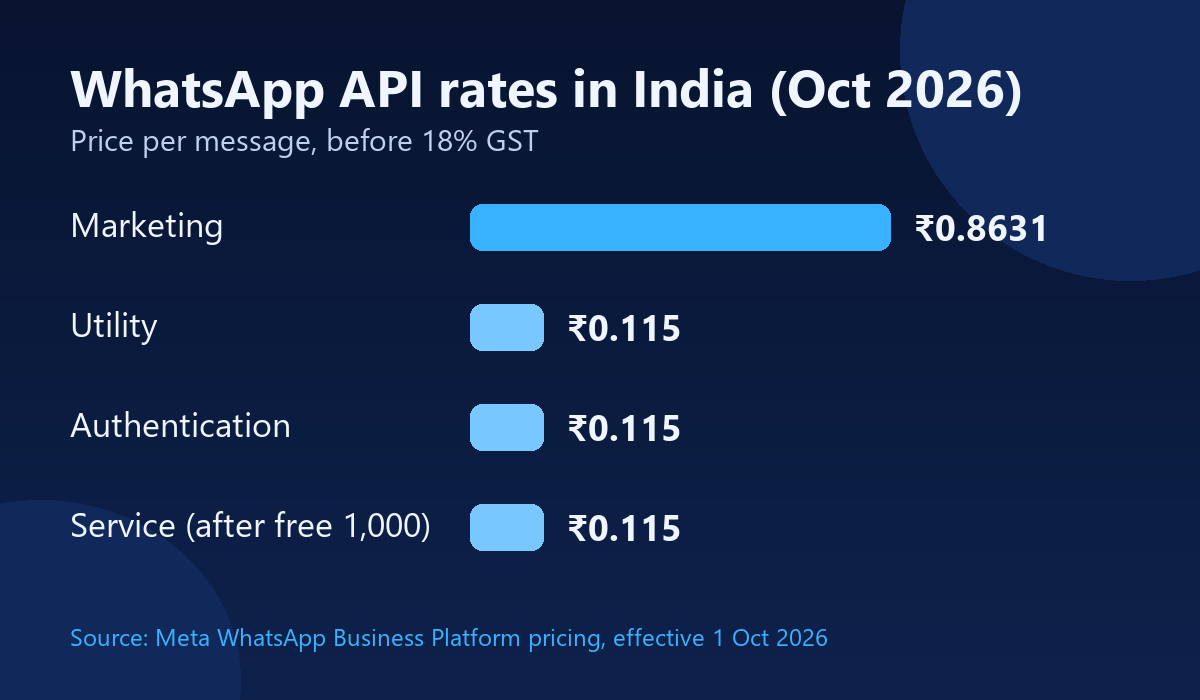
Marketing costs about 7.5 times as much as utility. That gap matters more than the new service charge, so keep it in mind when you decide what to send.
What it costs in real numbers
- 5,000 replies in a month on one number: the first 1,000 are free. The other 4,000 cost ₹460, or about ₹543 with GST. Before October, this was ₹0.
- 20,000 replies in a month: 19,000 charged messages cost ₹2,185, or about ₹2,578 with GST.
- 10,000 order updates as utility messages: ₹1,150, or about ₹1,357 with GST.
- 10,000 marketing messages: ₹8,631, or about ₹10,185 with GST.
The service charge is small per message. The danger is volume: a chatty bot, a busy support team, or long back-and-forth chats add up fast.
Why WhatsApp bills jump
- Replying one by one to the same questions again and again.
- Using the API for support chat when a cheaper channel would do.
- Sending promotions as marketing messages to people who never reply.
- Mixing order updates and promotions in the same template.
- Forgetting to add a payment method, which stops delivery.
6 ways to cut your WhatsApp bill
These are the steps I use.
1. Send one message instead of many replies
Customers ask the same questions all day: delivery time, returns, sizes, payment options. Instead of answering each person separately, I collect all the common questions and answers and use AI to turn them into one clear Q&A message. Then I send that to customers, so one message does the job of dozens of replies.
A note on this: a message to many customers at once goes out as a template, and Meta bills it by category. If the content looks promotional, it can be billed as marketing at ₹0.8631. Keep the message plain and useful, send it only to customers who have opted in, and check the category your template gets approved under.
2. Add a second business WhatsApp number
The free 1,000 messages apply per business phone number. A second number gives you another 1,000 free service messages each month and spreads the support load. Use it as a genuine separate line, for example one for sales questions and one for support.
3. Put a chat option on your website
If customers can ask questions in a chat box on your site, those chats do not use WhatsApp at all, so there is no per-message charge. Many questions get answered before the customer ever opens WhatsApp. I add a website chat widget on client stores for this reason (see some of my projects).
4. Use the WhatsApp API only for order and tracking updates
Order confirmations and tracking updates are what customers actually want on WhatsApp, and they are utility messages at ₹0.115 each. Keep support chat and promotions off the API as much as you can. If you handle a lot of orders, here is how I manage hundreds of ecommerce orders without mistakes.
5. Try Click-to-WhatsApp ads
When a customer messages you from a Click-to-WhatsApp ad, Meta opens a free entry point window. For a limited time, your marketing, utility, authentication and service messages to that customer are free. It works best for ads where you expect a conversation, such as a sale or a product enquiry.
6. Add a payment method and move to INR billing
Add a payment method in Meta’s Billing Hub, or messages stop delivering after the free 1,000. If your account is billed in another currency, Meta says India-based customers must migrate all messaging accounts to INR by 31 December 2026, or messages will not be delivered from 1 January 2027.
Checklist before the month ends
- ☐ Count how many service messages each number sends per month.
- ☐ Write your top 10 customer questions and turn them into one Q&A message.
- ☐ Add a chat box to your website.
- ☐ Move only order and tracking updates to the API.
- ☐ Separate promotional and order-update templates.
- ☐ Add a payment method in Billing Hub.
- ☐ Check your account currency and plan the INR migration.
Final thoughts
The new charge is small per message, but it rewards a smarter setup. Answer common questions once, move support chat to your website, and keep the API for orders and tracking. That alone cut a lot of cost for me.
Meta can update prices on the first day of each quarter (1 January, 1 April, 1 July and 1 October), so check the official page before you plan your budget: Meta’s WhatsApp Business Platform pricing.
If you want help setting up website chat, WhatsApp order updates or a cheaper messaging flow for your store, send me a message through the contact page. And if your store is not selling as it should, read 5 ecommerce mistakes that quietly kill your sales.
Prices are Meta’s published India rates effective 1 October 2026, before 18% GST. Provider fees, if any, are extra.
1 comment